OpenChatCut Slash Commands & Custom Skills: SKILL.md Workflows for AI Video Editing
Learn OpenChatCut slash commands and custom agent skills: /skill picker, ~/.openchatcut/skills SKILL.md playbooks, progressive load_skill, and reusable AI video editing workflows without overwriting your prompt.
 OpenChatCut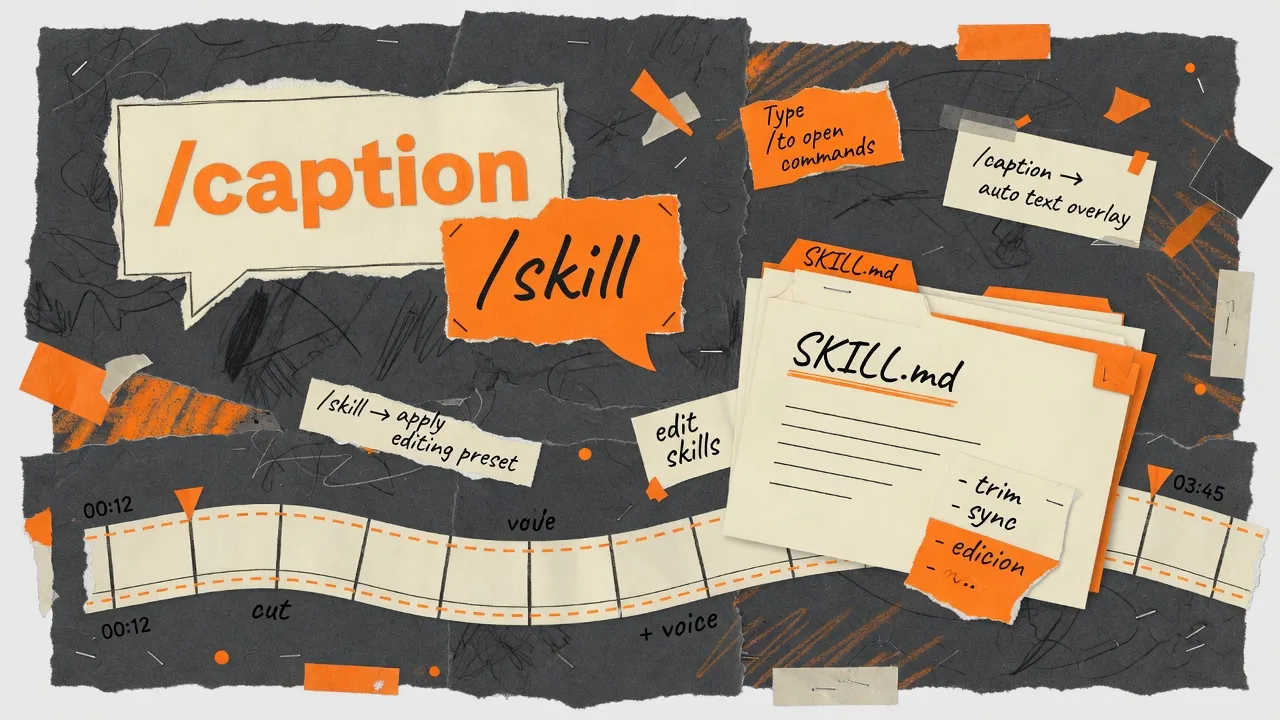
OpenChatCut slash commands let you activate custom agent skills for AI video editing without losing the prompt you already typed. In 0.1.8, creative workflows become user-visible SKILL.md files under ~/.openchatcut/skills/, selectable with /skill:<slug> or /name, and shown as a dismissible chip—never as forced text dumped into the composer.
If you searched for agent skills for video editing, SKILL.md workflow, slash command AI editor, or reusable ChatCut-style playbooks, this guide is the practical path.
Why slash skills matter for agent-native video editing
OpenChatCut is an open-source AI video editor and ChatCut alternative where agents edit a real multitrack timeline. Skills package editorial policy—how to recut interviews, caption verticals, clean pauses—so you do not retype the same rules every session.
A skill is not a finished render. It is progressive guidance (load_skill) that steers the Agent while you keep timeline control, undo, and export.
What is an OpenChatCut skill?
| Concept | Meaning in OpenChatCut |
|---|---|
| Skill | Packaged workflow guidance + optional scripts |
| SKILL.md | On-disk skill file with frontmatter and steps |
| Slash command | Chat / picker to activate a skill |
| Chip | UI badge showing the active creative mode |
| load_skill | Progressive disclosure so long guides do not bloat the always-on prompt |
Where custom skills live
~/.openchatcut/skills/<slug>/SKILL.md
Windows:
%USERPROFILE%\.openchatcut\skills\<slug>\SKILL.md
manage_skill createinstalls into this directory- Hand-written
SKILL.mdfiles are auto-discovered - Layout mirrors familiar Codex / Claude skill folders
How to use slash commands in OpenChatCut Agent chat
- Focus the built-in Agent chat input.
- Type
/plus a name fragment, or/skill:plus a slug. - Filter the list; press Tab or Enter to activate.
- Confirm the active skill chip above the input.
- Type your real editing request—activation never overwrites the composer.
- Dismiss the chip to return to the default agent.
Example prompts after skill activation
Good prompts combine skill constraints + concrete goal:
- “Use this workflow on A1 dialogue only; leave V1 B-roll.”
- “Apply caption skill for 9:16, then stop for review.”
- “Follow the skill structure but do not add music yet.”
Bad prompts restate the entire skill body. Trust the loaded playbook; add project-specific boundaries.
How to write a custom SKILL.md for video editing
Create:
~/.openchatcut/skills/recut-podcast/SKILL.md
Minimal template:
---
name: recut-podcast
description: Tighten podcast interviews—fillers, pauses, caption-ready speech—on a multitrack OpenChatCut timeline.
---

# Recut podcast

1. Confirm spoken track, fps, and language.
2. Prefer transcript tools before hard video splits.
3. Remove fixed fillers; compress long pauses; keep a breath gap.
4. Report changes; wait before multi-track layout or music.
SEO-friendly skill authoring tips
- Put non-negotiable rules early (“never delete legal names”).
- Use imperative steps agents can execute with OpenChatCut tools.
- Name the skill after the user job (
recut-podcast,vertical-captions), not internal codes. - Keep one skill = one workflow; split “captions” from “color grade”.
You can scaffold with the bundled skill-creator workflow, then edit the file yourself.
Skill vs plain prompt vs MCP external agent
| Approach | Best for |
|---|---|
| Plain chat prompt | One-off edits fully described in one message |
| Slash skill / SKILL.md | Repeatable house style across sessions and teammates |
| External MCP (Codex / Claude Code) | IDE-driven automation on the same OpenChatCut project |
Skills complement MCP; they do not replace read_project, frame checks, or human review. See MCP with OpenChatCut and the 0.1.8 release.
FAQ: OpenChatCut slash skills and SKILL.md
What is the OpenChatCut slash command for skills?
Use /skill:<slug> or / + skill name in Agent chat. Tab/Enter activates the creative mode without changing your typed prompt.
Where do I put custom OpenChatCut skills?
~/.openchatcut/skills/<slug>/SKILL.md on macOS/Linux, or %USERPROFILE%\.openchatcut\skills\... on Windows.
Do slash skills overwrite my chat draft?
No. Activation only switches the active workflow chip. Composer text stays yours.
Can I use skills with Codex or Claude?
Bundled and custom skills are product playbooks for OpenChatCut. External agents via MCP still operate the same timeline tools; keep policies short in SKILL.md so any client benefits.
Is this only for ChatGPT?
No. Skills work with the built-in Agent across providers (cloud APIs, ChatGPT/Codex path, Ollama, LM Studio, etc.) depending on your settings.
How is this different from captions or templates?
Captions are viewer-facing text. Templates/MG are visual assets. Skills are agent procedures for editing decisions.
Related keywords and resources
OpenChatCut · open-source AI video editor · agent skills · SKILL.md · slash command · custom agent workflow · local-first video editor · ChatCut alternative · MCP video editing · multitrack AI editor